
Strategy Builder Guide
Every strategy is built from four sections: signal configuration, entry sizing, risk management, and exit rules. This guide covers every option in detail.
Overview
A strategy is a complete set of rules that tells PolySpy what to watch for, how to enter positions, how much risk to take, and when to exit. You can run multiple strategies simultaneously, each with different configurations and even different credentials.
Every strategy follows the same four-part pipeline:
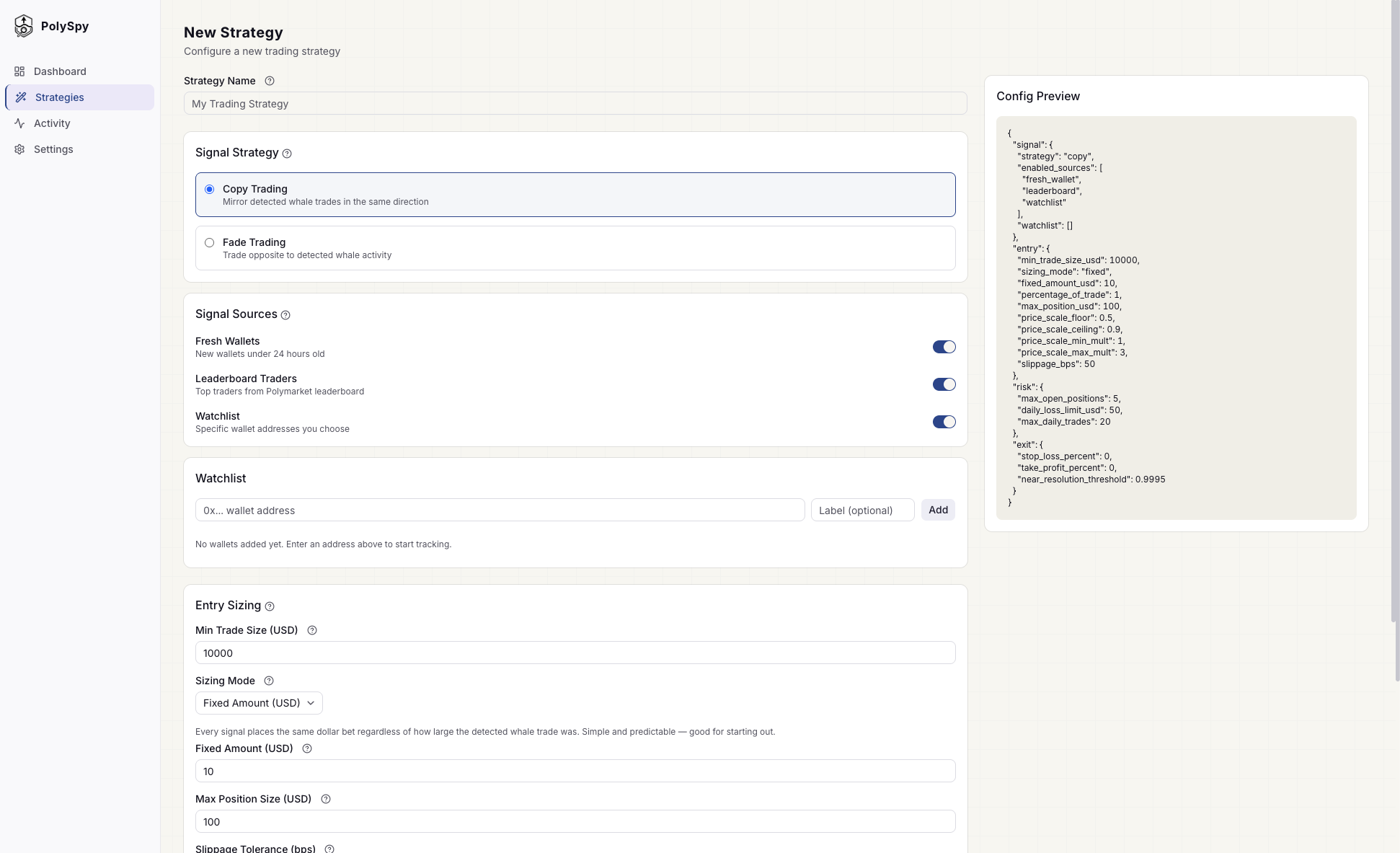
The strategy builder with signal configuration, sources, and live JSON preview.
1. Signal Configuration
Signals are the events that trigger your strategy. This section controls what you react to and in which direction.
Strategy Direction
Mirror detected trades in the same direction. When a whale buys YES, you buy YES. When they sell, you sell.
Take the opposite side. When a wallet buys YES, you buy NO. Profit when the detected trade turns out to be wrong.
Signal Sources
Enable one or more sources. At least one must be active. Each source runs independently — if any source fires, the strategy evaluates the signal.
Wallets less than 24 hours old placing trades above your minimum size. Often indicates whale activity through new proxy accounts.
Learn moreThe top 75 Polymarket traders ranked by all-time P&L. The roster updates automatically as rankings shift.
Learn moreSpecific wallet addresses you add manually. Build a curated network of wallets based on your own research. Watchlist trades bypass the minimum trade size filter.
Learn moreYou can combine all three in a single strategy. For example: copy trade leaderboard + fresh wallets, while also tracking specific wallets on your watchlist.
2. Entry Sizing
Entry rules control how much you bet when a signal fires. This section also sets the minimum whale trade size that qualifies as a signal.
Minimum Trade Size (USD)
Only whale trades above this dollar amount trigger your strategy. This filters out noise from small retail trades. Default is $10,000. Lower it to catch more signals, raise it to only react to large moves.
Note: Watchlist trades bypass this filter regardless of size, since you've explicitly chosen to track those wallets.
Sizing Modes
Choose one of three modes for calculating your position size per signal:
Fixed Amount
Recommended for beginnersBet the same dollar amount on every signal. Simple and predictable — you always know your maximum exposure per trade.
Example: Whale buys $50,000 of YES at 0.62 → you buy $10 of YES at 0.62.
Percentage of Trade
Scale your bet relative to the whale's trade size. Larger whale trades produce larger positions, smaller trades produce smaller ones.
Example: Set to 0.001 (0.1%). Whale buys $50,000 → you buy $50.
Price Scaled
AdvancedDynamically adjust your bet size based on the current market price. Bet more when the price is in your favor (near the floor) and less when it's less favorable (near the ceiling).
Example: With defaults and a $10 base, price at 0.5 → bet $30 (3x). Price at 0.9 → bet $10 (1x). Price at 0.7 → bet ~$20 (linearly interpolated).
Additional Entry Settings
| Setting | Default | Description |
|---|---|---|
| max_position_usd | $100 | Maximum total holding in a single market. Prevents over-concentration. If an existing position plus the new trade would exceed this, the trade is skipped. |
| slippage_bps | 50 bps (0.5%) | Maximum price slippage tolerance for limit orders. If the market moves beyond this threshold before your order fills, it won't execute. |
3. Risk Management
Risk controls act as circuit breakers — they automatically pause trading when limits are hit. These protect you from runaway losses and overtrading during volatile periods.
Max Open Positions
The maximum number of markets your strategy can be in at the same time. When this limit is reached, new signals are ignored until an existing position closes.
Higher limits increase capital at risk but capture more opportunities. Choose a value that matches your risk tolerance.
Daily Loss Limit (USD)
Primary circuit breakerMaximum realized losses per day before the strategy automatically pauses. This is the single most important risk control — it prevents cascading losses on bad days. Resets at midnight UTC.
Max Daily Trades
Maximum number of entry trades per day. Prevents overtrading during high-activity periods (e.g., election nights, major news events). Resets at midnight UTC.
4. Exit Rules
Exit rules determine when and how positions are closed. Multiple rules can be active simultaneously — whichever triggers first closes the position. If no exit rules are configured, positions stay open until the market resolves.
Stop Loss (%)
Automatically sell if the position drops by this percentage from your entry price. This limits downside risk on any single trade.
Example: 20% stop on a position entered at $0.60 → sell if price drops to $0.48.
Take Profit (%)
Automatically sell if the position gains by this percentage. Locks in profits before the market can reverse.
Example: 50% take-profit on a position entered at $0.60 → sell when price reaches $0.90.
Near Resolution Threshold
Auto-close when the market price reaches near 0 or 1, indicating the outcome is essentially decided. This exits before final resolution when remaining upside is minimal but reversal risk still exists.
Paper vs Live Mode
Every strategy starts in paper mode. Paper and live use the exact same signal detection, execution logic, and risk controls — the only difference is whether real orders are placed.
- Simulated trades — no real money at risk
- Full P&L tracking and trade history
- Telegram alerts and webhook events still fire
- Execution marked as
is_paper: true
- Real orders placed on Polymarket
- Requires Polymarket credentials configured
- Same risk controls and monitoring as paper
- Can be paused and resumed at any time
Paper performance does not guarantee live results
Strategies often lose alpha when trading with real money. Paper trades have no market impact, but live trades move prices, incur slippage, and compete with other participants reacting to the same signals. A strategy that is profitable in paper mode may perform differently — or lose money — in live mode. Always trade with capital you can afford to lose.
Credential Overrides
By default, strategies use your account-level credentials for Telegram alerts, Polymarket execution, and webhook delivery. You can override any of these per-strategy — useful when you want different strategies to:
- Send alerts to different Telegram chats
- Trade from different Polymarket wallets
- Route webhook events to different endpoints
Configure overrides from the Credentials tab on any strategy's detail page.
Strategy Tips
Start in paper mode
Validate your strategy against live market data before committing real capital. Paper mode uses identical logic to live mode, so you can observe signal quality and execution behavior risk-free.
Understand the risks of going live
Paper performance does not guarantee live results. Real trades create market impact, incur slippage, and compete with other participants acting on the same signals. Strategies often lose alpha when trading with real money.
Configure risk controls
Stop-losses, daily loss limits, and position limits are your safety nets. Set them to levels that match your personal risk tolerance — never trade with more than you can afford to lose.
Combine signal sources
A strategy that tracks fresh wallets AND leaderboard traders catches a broader range of opportunities. Each source has different strengths.
Run multiple strategies
You can run a copy strategy on leaderboard traders and a fade strategy on fresh wallets simultaneously. Each has independent risk controls.
Use webhooks for custom logic
If the built-in sizing and exit rules aren't flexible enough, use webhooks to receive signals and apply your own execution logic.