
Signal Sources
PolySpy monitors Polymarket around the clock using three independent signal sources. Each detects a different type of high-conviction activity. Use them individually or combine all three in a single strategy, with market filters to focus on the domains you know best.
How Signals Work
A signal is generated when PolySpy detects a qualifying trade from one of your enabled sources. When a signal fires, the strategy evaluates it against your entry rules (minimum trade size, price thresholds) and, if it passes, either places a trade or sends a notification — depending on your configuration.
Each source identifies wallets through a different method, but they all feed into the same strategy pipeline. This means your entry sizing, risk controls, and exit rules apply identically regardless of which source triggered the signal.
Fresh Wallet Detection
Fresh wallet detection monitors all Polymarket trading activity in real time and flags wallets that are less than 24 hours old. When a new wallet places a trade above your minimum size threshold, that's a signal.
Why fresh wallets matter
Large Polymarket traders often create new proxy wallets to disguise their activity. A brand-new wallet placing a $50,000 trade is almost certainly controlled by someone with significant conviction and capital — not a casual retail bettor. These wallets move markets before anyone else notices.
What qualifies as a signal
| Wallet age | Less than 24 hours since first transaction on Polymarket |
| Minimum trade size | Configurable per strategy (default $10,000). Filters out small retail noise. |
| Detection | Real-time via WebSocket — typically within seconds of the on-chain trade |
Typical patterns
Copy opportunity
A fresh wallet buys $100k of YES on a political market 2 hours before a major poll drops. The whale had early information or strong conviction — copying captures the move.
Fade opportunity
Multiple fresh wallets simultaneously buy YES on a meme market, pumping the price. This looks coordinated — fading profits when the price reverts to fundamentals.
Leaderboard Tracking
PolySpy tracks the top 75 Polymarket traders ranked by all-time profit and loss. These are proven winners who have demonstrated consistent edge across hundreds of markets. When any of them enters a new position, that's a signal.
How it works
The top 75 list is refreshed automatically as Polymarket's rankings shift. If a trader drops out of the top 75, they're removed. New entrants are added immediately.
All 75 wallets are monitored continuously via WebSocket. Signals fire within seconds of a qualifying trade.
What qualifies as a signal
| Trader rank | Top 75 by all-time P&L on Polymarket |
| Minimum trade size | Same as your strategy's min trade size setting (default $10,000) |
| Signal data | Includes the trader's username, rank, P&L, and time period in the webhook payload |
Custom Watchlists
Watchlists let you track specific wallet addresses you've identified through your own research. Build a curated signal network of traders whose behavior you want to follow or fade.
Key features
Tag each wallet with an optional label so you remember why you added it — e.g., “Election trader”, “Crypto OG”, “My friend who's always wrong”.
Watchlist trades bypass the strategy's minimum trade size threshold. Since you've explicitly chosen to track these wallets, every trade qualifies as a signal regardless of size.
Watchlist wallets are monitored via the same WebSocket infrastructure as the other sources. Signals fire within seconds.
How to find wallet addresses
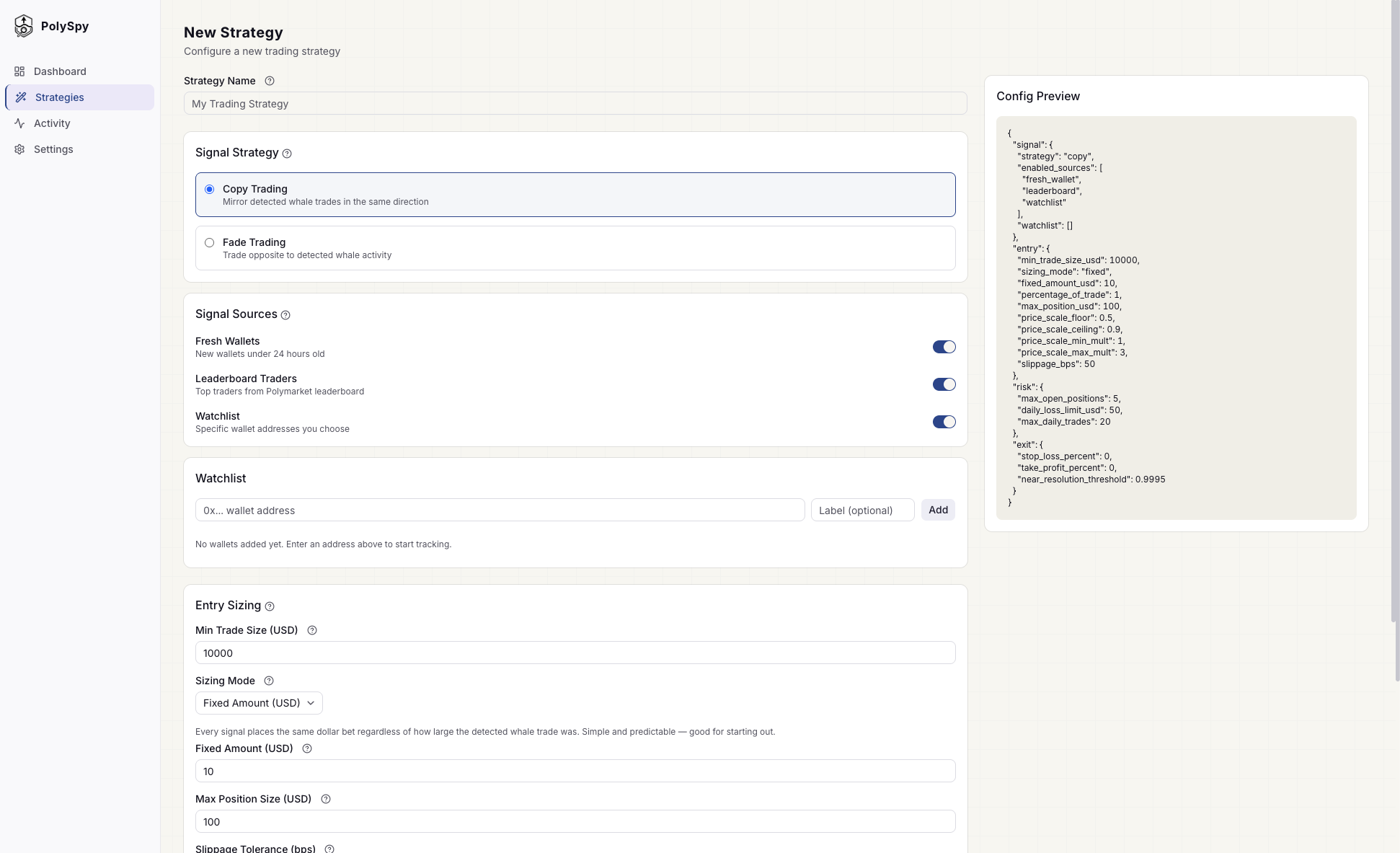
The watchlist section in the strategy builder where you add wallet addresses.
Market Filters
Not every market is worth trading. Market filters let you exclude signals from categories or topics that don't match your expertise or strategy thesis.
Category Exclusions
Exclude entire market categories from triggering your strategy. PolySpy supports 40+ Polymarket categories including Sports, Politics, Crypto, Science, Entertainment, and more. If a signal comes from an excluded category, it's silently skipped.
Keyword Exclusions
Exclude markets whose title contains specific keywords (case-insensitive substring match). Useful for filtering out niche topics within categories you otherwise want to track.
Both filters apply to all signal sources. A signal from any source is skipped if the market matches an excluded category or keyword.
Combining Sources
You can enable all three sources on a single strategy. Each source runs independently — any qualifying trade from any source fires a signal. This gives you broader coverage without needing to create separate strategies.
Example configurations
Broad copy strategy
Copy trading with all three sources enabled. Captures the widest range of high-conviction activity.
Smart money only
Copy only proven leaderboard traders. Higher conviction, fewer signals.
Contrarian fade
Fade fresh wallets — bet against suspicious new accounts that may be manipulating prices.
Curated network
Copy trade only wallets you've hand-picked through your own research. Maximum control over signal quality.
Tip: You can also run a copy strategy on leaderboard traders and a separate fade strategy on fresh wallets — each with their own risk controls. Multiple strategies operate independently.
Deduplication
When multiple sources are enabled, the same wallet could theoretically trigger signals from more than one source (e.g., a fresh wallet that's also on your watchlist). PolySpy automatically deduplicates these so you don't get double entries.